 Ozone v 7.0
11 nov. 2015
MacOS X Intel
Ozone v 7.0
11 nov. 2015
MacOS X Intel
Vintage Limiter: Glue a mix together, control dynamic range, and add character
Vintage Tape (Advanced only): Add the distinctive sonic characteristics of analog tape to modern digital recordings
Vintage Compressor (Advanced only): Add subtle warming and sweetening effects with a single-band, program-dependent vintage compressor
Vintage EQ (Advanced only): Add the richness, warmth, and color of analog equalization to digital audio
Maximizer with new IRC IV mode: Increase perceived loudness without pumping or distortion with the mode’s innovative new spectral shaping technology
Dynamic EQ: Now included in both versions of Ozone with improved features and optimized performance
A comprehensive bank of presets: Achieve authentic sounds for any genre and style and explore Signature Mastering Presets from Greg Calbi, the notable mastering engineer whose career spans from John Lennon to Bruce Springsteen to Lady Gaga and Tony Bennett
New export options: Encode mastered audio to MP3 and AAC formats
Ozone v 6.1
22 mars 2015
MacOS X Intel
Produce louder, clearer, and fuller masters with Adaptive Release:
This new mode for the Dynamics module intelligently automates the difficult task of finding the right release times. The compressor actually responds to the audio in real time, adjusting the release values based on the transient properties of the incoming signal.
Without Adaptive Release, you’d have to pick an average release value to service both transients and sustained signals—or do twice the work! Adaptive Release does the hard work for you transparently, so you can dive right into the creative aspects of mastering without a frustrating learning curve.
Add a warm, analog sound with Tube Limiting mode:
Vacuum tubes have long been praised for their ability to add color and character to cold, sterile, and flat-sounding recordings. The Tube Limiting mode for the Maximizer module combines warmer, more analog-sounding final stage limiting with the ease and precision of digital maximizing. The resulting audio has a tube warmth while remaining competitively loud and appropriate for modern mastering.
With a new algorithm inspired by tube hardware limiters like the Fairchild 670, the Tube Limiter blends the best of digital and analog, adding a vintage sonic character to Ozone’s maximizing algorithm.
Creatively tweak with confidence with Module Presets:
For Ozone 6.1, we brought back Module Presets, so it's now easy to creatively experiment with different module combinations. You can load and save settings for individual modules without affecting the settings of other modules.
The Module Preset system’s simplified interface is more conducive to working with individual modules. Save your settings to instantly load up on your next track or project. Get confidence from using professionally designed presets while still retaining creative control over your signal chain.
And more:
The new update includes a number of other additions and enhancements to help streamline your workflow and offer a richer user experience. You can select and loop regions in the Waveform Segmentation Overlay, export files with automatic track numbering for better organization, and more.
Ozone v 6.0
31 oct. 2014
MacOS X Intel
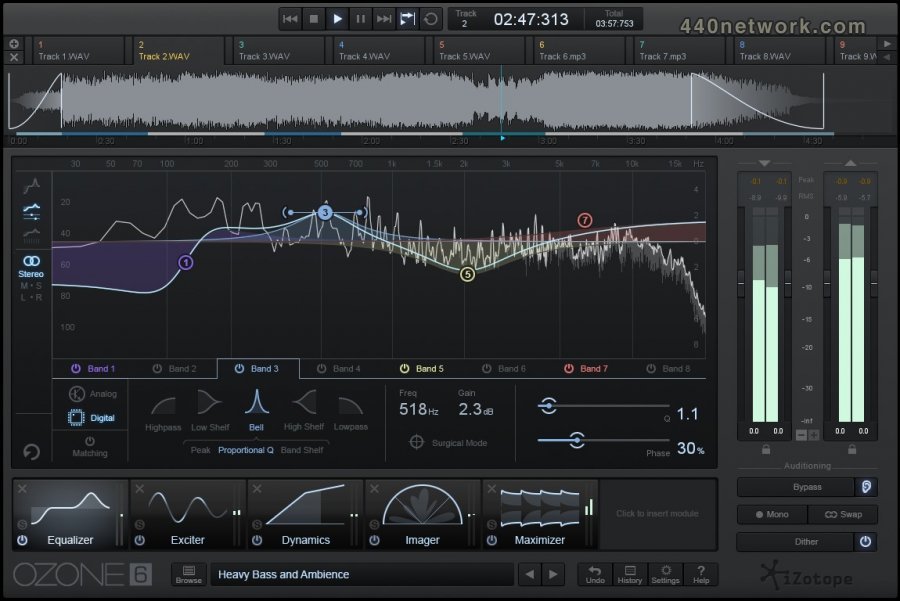
Ozone 6 features the largest user-interface overhaul in iZotope history. We’ve created an elegant and striking visual aesthetic that guides users through every stage of the mastering process. Alongside a fluid workflow, the creative elements of mastering are now front and center, so users can define their own sound with ease.
Ozone 6 Advanced Highlights:
Dynamic EQ Module
Dynamic EQ Component Plug-in
Ozone 6 Highlights:
New Analog Hardware-modeled EQ filter shapes
Surgical Mode
Variable EQ Phase Control
Seamless Bypass
Customizable Signal Chain
Module Gain Meters
Transient Emphasis
Triode and Dual Triode Exciter Modes
Stereoize Control
Variable Knee Compression
Dynamics Detection Enhancements
New Presets
Standalone Application
Ozone v 5.05b
13 déc. 2013
MacOS X Intel
Fixes and Enhancements:
Fixed intermittent crash in Pro Tools 11 on Windows 64-bit systems.
Fixed crash on Windows related to Fonts.
Fixed unresponsive Authorization Wizard when opening Pro Tools 11 sessions that include a demo of Ozone or Insight.
Fixed a 64 bit AAX bug where some list items wouldn't stay selected. For example, if trying to select IRC II in the Maximizer, the selection would skip back to IRC I.
Ozone v 5.04
2 juil. 2013
MacOS X Intel
Enhancements and fixes:
Plug-in formats: Added 64-bit AAX support for Pro Tools 11
Please note: This update no longer supports 32-bit AAX. Customers accustomed to using 32-bit AAX in Pro Tools 10 can instead use the RTAS plug-in format without any degradation in audio quality. For your convenience, any session saved with the 32-bit AAX version of Ozone will automatically open with RTAS.
Feature enhancements: Improved EQ filter speed
Fix: For the Matching EQ, snapshot selections will now always save with sessions
Fix: For the Matching EQ, fixed issue where snapshots would intermittently show/hide when selecting events in the History list
Fix: Fixed issue where Copy To Mid/Side/Stereo was not working properly
Fix: For Retina displays, fixed issue where combo boxes would display incorrectly
Ozone v 5.03
24 janv. 2013
MacOS X Intel
Enhancements and fixes:
Plug-in formats: Added AAX Native support for Pro Tools 10
Operating systems: Added Windows 8 support
Operating systems: Added OS X 10.8 support
Feature enhancement: Changed wording of "Match From" to "Reference" for the Matching EQ
Fix: Improved Host Bypass communication for component plug-ins (Advanced feature only)
Ozone v 5.02
31 janv. 2012
MacOS X Intel
Feature enhancements
Improvements to IRC3: lower distortion on low frequency material
Improvements to IRC3: new "Style" control helps the limiter work with a wider variety of material
Improved spectrogram functionality with better Meter Tap synchronization
Improved EQ behavior when double-clicking for a new node
Other changes and fixes
Improved keyboard support
Fixed issues with loading EQ snapshots in multiple instances in a session
Fixed crashes in Steinberg Wavelab
Fixed UI issue in OS X with Steinberg Wavelab 7.2
Fixed delay compensation issue for sampling rates above 48kHz
Fixed issues using crossover Learn feature inside shared crossover network
Improved Spectrogram behavior when hiding a spectrogram stream
Ozone v 5.01
28 nov. 2011
MacOS X Intel
Feature enhancements
Smoother transitions when browsing both Global and Module presets
Reduced clicks and pops when bypassing component plug-ins
Other changes and fixes
Fix for Audio Units (AU) validation issue for systems with certain Mac OS region settings
Fix for infrequent crashes in the Exciter module and Exciter component plug-in
Other minor fixes and enhancements
Ozone v 5.0
10 nov. 2011
MacOS X Intel
What's New in Ozone 5?
Pristine Sound and Enhanced DSP - Each module has been updated with refined signal processing algorithms to bring you a new level of mastering quality. The most complete mastering suite available has never sounded better.
Optimized Workflow and Updated Interface - iZotope has redesigned Ozone's user interface to allow for finer control while placing important features right at your fingertips. New users can jump in without a steep learning curve while experienced Ozone fans will feel right at home.
Visual Feedback - Every module features updated metering to help guide you to the perfect-sounding master.
Introducing Ozone 5 Advanced
Ozone 5 Advanced builds on iZotope's reputation for superior sound quality and industry-standard audio mastering tools. Each module in Ozone 5 Advanced is equipped with extended features made specifically for mixing and mastering professionals. For added flexibility, Ozone 5 Advanced allows customers to use each of the mastering modules as individual plug-ins. Combining essential visualization from Ozone's modules with new metering tools, the all-new Meter Bridge provides a suite of audio analysis tools that help you visualize changes made during the mastering process, troubleshoot problematic mixes, and compare reference tracks.
Ozone 5 Advanced Includes:
Extended Features - Ozone 5 Advanced provides deeper control within every module in Ozone. Advanced exclusives include a variable-phase EQ, Loudness Maximizer modes with Transient Recovery and Stereo Link controls, mono-compatible stereo synthesis features and much more.
Meter Bridge - The powerful Meter Bridge introduces a high resolution real-time 3D spectrogram with unique mix analysis features, BS.1770-2 compatible stereo loudness metering, resizable spectrum analyzer, and a vectorscope with stereo balance and correlation meters.
Meter Taps - For mixing and stem mastering, multiple audio streams can be superimposed on a 2D or 3D plot using Ozone 5 Advanced's Meter Tap plug-ins. Meter Taps enable unprecedented visualization of how a mix's elements fit together.
Component Plug-ins – Use Ozone 5 Advanced's mastering modules as an integrated mastering system or as individual plug-ins. Move module presets between Ozone 5 Advanced and its components freely.
 Ozone v 4.0.4
9 sept. 2011
MacOS X UB
Ozone v 4.0.4
9 sept. 2011
MacOS X UB
Improved compatibility with Final Cut Pro and Soundtrack Pro
Added 64-bit support for VST and AU on OS X
Fixed 64-bit iLok support on Windows
Ozone v 4.0.3b
1 juil. 2010
MacOS X UB
* Compatibility fix with AudioSuite in Pro Tools 8.0.4 and later
* Fixed problem where UI can flicker when clicking mouse in Pro Tools 8
Ozone v 4.0.3
17 févr. 2009
MacOS X UB
* Added Brightness control under General Options. You can use this to improve the legibility of the Ozone 4 user interface if it is hard to read on your monitor.
* Improved CPU usage for Room Reverb mode. New Room Reverb Buffers option in the EQ/Reverb/Crossover tab of options menu.
Ozone v 4.0
16 janv. 2009
MacOS X UB
Presets
* New Preset Manager with improved workflow. Undock it to a floating window so you can work with presets while tweaking Ozone's modules
* 140 professionally designed presets help you get results faster than ever before
* MacroPresets—each preset now contains one or more MacroFaders that allow you to quickly tweak a preset's sound without leaving the preset manager
* MacroPreset Editor lets you link multiple parameters from Ozone's modules to your own custom MacroFaders
* Preset Folders help you find the perfect starting point faster, and you can organize your own presets any way you like
Workflow
* Beautifully redesigned graphical user interface with controls and labels that are easier to work with on high-resolution displays
* Module Amount Controls allow you to intelligently apply more or less of each module quickly and easily
* Global Amount Control lets you dynamically apply more or less of Ozone's processing with one single control
* Significant optimizations throughout Ozone to reduce CPU usage, especially when making changes to parameters
* Automatic Bypass Gain control enables Ozone to match its own effective gain when bypassed letting you A/B processed and unprocessed audio at the same perceived loudness
* Bypassed modules are grayed and display a blinking red "bypass" indicator (optional) to make it easier to see which modules are inactive
* Bypass or Solo mid and side channels as you work to hear the effect each module has on the soundstage
* Fader Compare—shift click any fader to jump between its current and last value for quick A/B comparisons
* Keyboard shortcuts in Ozone can be partially or fully disabled—useful if Ozone shares shortcut keys with your host application
EQ
* Redesigned interface for better workflow
* Mid/Side equalization with Bypass/Solo controls and transparent, color coded EQ curve displays
* Info Panel can now be docked at the bottom of the EQ display and does not hide the EQ's controls and spectrum analyzer
* EQ nodes are now numbered for easier automation and adjustment
* Select and drag multiple EQ nodes to adjust their gain, frequency and Q relative to each other
* Significant CPU optimizations—changes to the EQ require less CPU overhead
Reverb
* Mid/Side support for both Plate and Room reverb modes—adjust reverb separately on center and edges of your audio
* Improved metering
Maximizer
* New "Intelligent II" mode offers superior processing quality on transient source material—get loud, full mixes without distortion and pumping
Exciter
* New Warm mode produces only even harmonics with a fast decay rate, adding another unique color to Ozone's Harmonic Exciter
* Mid/Side processing is available for all algorithms and bands
Dynamics
* Auto gain compensation—automatically sets the makeup gain to compensate for changes in loudness due to dynamics process
* Mid/Side support for all bands and meters
* Mix Control provides built-in parallel compression
* Includes global controls for all bands as well as separate controls for mid/side in each band
Imaging
* Improved metering including redesigned vectorscope and correlation meter
* Meters can now fade out their history rather than their old infinite hold behavior
Crossover
* New Hybrid Crossover algorithm—combines Analog and Digital methods, offering analog character with perfect reconstruction characteristics
* Learn function will evaluate the incoming source material and find natural crossover points automatically
* Significant CPU optimizations—changes to crossover frequencies require less CPU overhead
* The Mute control on each band has been converted to a Solo control for improved workflow
* Crossover cutoff values can be keyed in manually by double-clicking the readouts and typing
Meters
* Complete K-System metering support, as specified in popular publications by Bob Katz
* Completely redesigned Input/Output Meters offer improved ballistics and joint RMS and Peak metering modes
* Meters can detect inter-sample peaks for metering of true analog peak levels
* Gain can be entered numerically by double-clicking the gain readouts
* Linear and non-linear dB scale options
* Selectable metering source—choose between stereo and mid-side meters.
Ozone v 3.14
10 janv. 2008
MacOS X UB
Mac OS X Leopard support
Performance and stability improvements (especially in Pro Tools)
Ozone v 3.10
10 août 2006
MacOS X UB
Amélioration de performance processeur
Ozone v 3.09
20 juil. 2006
MacOS X UB
support Universal Binary
nouveau système d'autorisation automatique
Q de la fonction alt-solo modifiable par molette de souris
crossover des modules multibandes plus doux
amélioration de la compensation de délai
correction de bugs
 Ozone v 3.06
15 nov. 2004
MacOS X PPC
Ozone v 3.06
15 nov. 2004
MacOS X PPC
Corrige un problème avec le validateur AudioUnit Logic 7
moins...


 Windows


Vous devez vous identifier pour poster un commentaire:
Identifiez vous grace à votre compte 440Software (MacMusic, PcMusic, 440TV, 440Forums, 440Software, ...) ou via votre compte FaceBook, Twitter ou Google.