Harmony Navigator

Category Education and composition / Reference
Version 2.6.2b3
Format App
Compatibility Harmony NavigatorMacOS X Intel
Licence Commercial Software
Price $193  /  149€
Rating
Updated On Jan 21, 2013
Total Downloads 2,700
Mac Downloads 1,813
Category Education and composition / Reference
Version 2.6.2b3
Format App
Compatibility Harmony NavigatorWindows XP
Licence Commercial Software
Price $193  /  149€
Rating
Updated On Jan 21, 2013
Total Downloads 2,700
PC Downloads 887

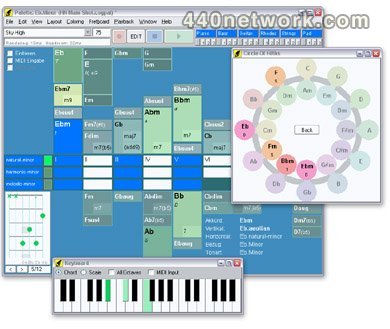
Explore keys and chord changes and find ideal harmony for your music.

Start writing better songs today. Harmony Navigator is an innovative tool for songwriters, keyboarders, guitarists and creative musicians looking for exceptional and beautiful chord changes. The intelligent companion helps you expand on your songwriting and instrumental skills intuitively and without struggle. Whether you are a beginner or an experienced musician: Being able to point-and-click your way through harmony space will instantly give rise to fresh ideas and insights. Every click is accompanied by simulated musicians in real-time. Learn how to play particular chords and scales on the keyboard and many string instruments by following graphical patterns. Record and edit your own progressions step by step. Import a melody and let the harmonizer find suitable chord changes for you. Harmony Navigator renders excellent accompaniments that can be exported as MIDI files. The pro-level software is fully customizable.
Mac OS X 10.5, 10.6, 10.7 Intel Mac @ 1 GHz
Windows XP, Vista, 7
Harmony Navigator Harmony Navigator v 2.6.2b3 Jan 21, 2013 MacOS X Intel
Cognitone Harmony Navigator Harmony Navigator v 2.5.6b5 Aug 17, 2012 MacOS X Intel
Cognitone Harmony Navigator v 2.5.5 Jun 29, 2012 MacOS X Intel
harmony Harmony Navigator v 2.5.4b2 Jun 12, 2012 MacOS X Intel
changes Harmony Navigator v 2.5.1 Mar 30, 2012 MacOS X Intel
Harmony Navigator 2.5.1
Feature Enhancements:
  • Improved support for external hardware synths

  • Ability to rename a phrase in a library

  • Added option to relocate a MIDI instrument to another port

  • Improved sound template browser behavior

  • Ability to drop a song section on library to save all phrases


  • Resolved Bugs:
  • Error when deleting a device description from disk

  • Palette printing crashed (regression) [AR1247]

  • Realtime-pattern playback in palette started with a hickup

  • SMF Export: Invalid infinite note durations in midi file [AR1244]

  • SMF Export: Ensure 16 unique channels, if multiple ports use same channel [AR1245]

  • MSB/LSB bank selection not copied when using sound template

  • Playback: Fixed a graphical glitch with playhead display in loops

  • Unused instrument should keep Null Sound until assigned [AR1240]


  • Other Changes:
  • Updated user manuals (PDF)

  • Library should only accept phrases and sections

  • Playback: Send sound selection once only per port & channel [AR1246]

  • Supply a default device name for MIDI instruments created from template sounds

  • Fixed a graphics glitch with level meters

  • Sound browser dialog: Remember and pre-select last used device

  • MSB/LSB bank selection info shown in inspector now

  • Show a warning when MIDI instrument conflicts with shared device on same port

  • Ensure program selection is sent on first playback [AR1220]


  • Harmony Navigator 2.5
    Feature Enhancements:
  • Replaced entire MIDI subsystem

  • Made phrase library customizable by user [AR1120]

  • Red, orange green color indicator for current sound status

  • Instrument picker: Rewritten, fixed many issues

  • New installers, setup utilities and download procedure

  • Customized presets now saved to "Config" in user's project folder

  • Option to no longer use the built-in GM synth [AR1167]

  • Multiple instruments can now play to same port & channel individually

  • Added Alto Flute, Bass Flute & Bass Clarinet to instrument hierarchy

  • Added a working panic button

  • Progress notification bar in lower bottom for various actions

  • Option to select the Null Sound, if needed


  • Resolved Bugs:
  • Mute & solo switching was broken

  • Instrument preview and MIDI file import preview was muted

  • Mac installer had issues with file ownerships (broken installs)

  • (MacOS X) Mac installer had issues with file ownerships (broken installs)

  • Coloring scheme does not update during playback (regression) [AR1182]

  • Fixed a bug that caused songs to get corrupted

  • Recording hung if global metronome sound could not be found

  • Snow Leopard and later: "Save As..." dialog opens with suggested filename filled in

  • (MacOS X) Snow Leopard and later: "Save As..." dialog opens with suggested filename filled in

  • Loading a customized catalog caused a crash

  • Fixed bropken drag & drop rectangle shape offset

  • Connections lost when renaming device id

  • Incorrect sound allocation when device was already full

  • (MacOS X) Mac menu bar could get unresponsive

  • MidiSetup: Fixed display update issues

  • Fixed bug with pitch wheel SMF import and midi output

  • Fixed several bugs with midi file import

  • Some preference settings not remembered

  • Crash when exporting device to XML

  • Problem that caused accompaniments to break on load

  • File dialogs sensible to crashes or other oddities

  • Fixed a crash with figure recognition

  • Preview velocity setting of instrument not used for chords-only playback

  • Parameter and Vector menu not synced correctly [AR1231]

  • Playhead sometimes refuses to stop (graphics issue only) [AR1198]

  • Fixed issue with GM sound bank initialization

  • Fixed a bug when reloading all patterns

  • Fixed many issues with sound preview, solo, etc

  • Crash after deleting playing ranges of root instrument category

  • Various crashes in MIDI setup window

  • Fixed an error with sound allocation when original device absent

  • Menus happend to appear on the wrong monitor

  • Audio Setup: Sort order of sounds was inconsistent

  • Progression chord highlighting during playback was inconsistent

  • Instrument Browser: Ranges not accepted when they should

  • Track selection: Should not reset sound CCs and volume during playback

  • Fixed general issues with the Null sound

  • Menu item for undo was labeled wrong [AR1235]


  • Other Changes:
  • Devices: Multi-connector devices should show bank name per connector

  • Raise existing editors and config windows to the top when used

  • Made various windows toggle on/off state when buttons clicked

  • Reorganized installed product's directory structure

  • Ad-hoc created patterns go to a "Work" slot that is global

  • Streamlined many user interface details, tool tips, terminology, etc

  • Midnam files should also allow XML file extension

  • Renamed "Vector" menu to "Transform" [AR1227]

  • Last palette coloring should stay when playback stops [AR1183]

  • Switch to "Parameter" tab automatically when parameter is selected

  • Improved visual appearance of drag & drop from lists

  • Device editor: Now editable also when not connected

  • Don't show setup window on startup, if warnings were disabled

  • Instrument label should show original sound name even if replacement is used

  • Removed the instrument "Group" input field (no longer needed)

  • GM bank initialization should also work with empty prefix

  • Renamed methods of bank selection for more clarity

  • Changed misc default settings to better suit entry-level users

  • Cleaned up inspector layout for instrument & sound

  • Various cosmetic issues and user interface tweaks

  • Improved visual appearance of the keyboard widget

  • More contrast to Circle of Fifths colors [AR1228]

  • Fixed misc German translations [AR1236]

  • Fixed many minor graphics glitches [AR1237]
  • chord Harmony Navigator v 2.1.1 Feb 23, 2011 MacOS X UB
    Not available
    navigator Harmony Navigator v 2.1.0 Sep 22, 2010 MacOS X UB
    Not available
    musicians Harmony Navigator v 2.0.5 Jul 15, 2010 MacOS X UB
    Not available
    download Harmony Navigator v 2.0 Jun 9, 2010 MacOS X UB
    We invested a lot of work in order to enhance the features of Harmony Navigator and make it more comfortable to draft of entire songs. The new song window is the most important achievement. It features multiple parts on a timeline, which also supports loop playback. You can now maintain your entire project in a single window:

  • Progressions (Chords)


  • Use the full-featured embedded progression editor to set chords and scales separately for each part. Drop chords from a palette here, or capture progressions played live on any number of open palettes in real-time.

  • Instruments (Mixer)

  • This is the place to insert the phrases that your instruments are supposed to play in each part. Phrases are shown as graphical thumbnails that you can cut and trim to suit your needs. In order to simplify and speed up things, a global basis accompaniment serves as a shared default template for all parts.

    Harmony Navigator 2 Advanced Edition now supports pattern recognition and polyphony also for import and recording. Thus you can more easily build your own patterns from existing MIDI files.

    Use protected instruments (red) to record your melodies. These tracks will not be replaced when switching to another basis accompaniment, for example, to try out the best accompaniment style for a given vocal melody.

  • Harmonizer

  • Switch to this tab to find the key signature and chords that best match a given melody. Move your way forward, step by step, picking chords from the suggestions list at any position on the timeline and listen to the result immediately.

  • Other Enhancements (Both Editions)

  • We added support for customized or uncommon string instrument tunings by means of simple XML files. HN2 generates all possible chord patterns for your instrument automatically.

    Sound management has been much improved and simplified. MIDI ports are now referred to by name. External sound generators can be addressed directly via port name, channel and program change message. Setting up a device description in advance is no longer mandatory.

    A general overhaul of the user interface made it easier to use, more intuitive and robust.
    mac Harmony Navigator v 1.6.1 Mar 19, 2009 MacOS X UB
    Feature Enhancements:
  • Much simplified online update procedure

  • Added device support for manual mixing (best for virtual instruments)

  • Added "Simple MIDI Cable" device template


  • Resolved Bugs:
  • Fixed issues with printing on PPC Macs

  • Updated MIDI frameworks for better performance

  • Closing all open windows could have caused crash

  • Time ruler selection did not change keyboard input focus

  • Picking a chord from a popup menu sometimes crashed

  • Midi device with no free channels could have caused deadlocks

  • Value slider controller crashed for undefined values


  • Other Changes:
  • Improved stability and UI performance
  • more...
    windows Harmony Navigator v 1.5.3 Dec 15, 2007 MacOS X UB
    Now supports slash chords. Progression editing improved.
    less...
    Harmony Navigator Harmony Navigator v 2.6.2b3 Jan 21, 2013 Windows XP
    Cognitone Harmony Navigator Harmony Navigator v 2.5.6b5 Aug 17, 2012 Windows XP
    Cognitone Harmony Navigator v 2.5.5 Jun 29, 2012 Windows XP
    harmony Harmony Navigator v 2.5.4b1 Jun 12, 2012 Windows XP
    changes Harmony Navigator v 2.5.1 Mar 30, 2012 Windows XP
    Harmony Navigator 2.5.1
    Feature Enhancements:
  • Improved support for external hardware synths

  • Ability to rename a phrase in a library

  • Added option to relocate a MIDI instrument to another port

  • Improved sound template browser behavior

  • Ability to drop a song section on library to save all phrases


  • Resolved Bugs:
  • Error when deleting a device description from disk

  • Palette printing crashed (regression) [AR1247]

  • Realtime-pattern playback in palette started with a hickup

  • SMF Export: Invalid infinite note durations in midi file [AR1244]

  • SMF Export: Ensure 16 unique channels, if multiple ports use same channel [AR1245]

  • MSB/LSB bank selection not copied when using sound template

  • Playback: Fixed a graphical glitch with playhead display in loops

  • Unused instrument should keep Null Sound until assigned [AR1240]


  • Other Changes:
  • Updated user manuals (PDF)

  • Library should only accept phrases and sections

  • Playback: Send sound selection once only per port & channel [AR1246]

  • Supply a default device name for MIDI instruments created from template sounds

  • Fixed a graphics glitch with level meters

  • Sound browser dialog: Remember and pre-select last used device

  • MSB/LSB bank selection info shown in inspector now

  • Show a warning when MIDI instrument conflicts with shared device on same port

  • Ensure program selection is sent on first playback [AR1220]


  • Harmony Navigator 2.5
    Feature Enhancements:
  • Replaced entire MIDI subsystem

  • Made phrase library customizable by user [AR1120]

  • Red, orange green color indicator for current sound status

  • Instrument picker: Rewritten, fixed many issues

  • New installers, setup utilities and download procedure

  • Customized presets now saved to "Config" in user's project folder

  • Option to no longer use the built-in GM synth [AR1167]

  • Multiple instruments can now play to same port & channel individually

  • Added Alto Flute, Bass Flute & Bass Clarinet to instrument hierarchy

  • Added a working panic button

  • Progress notification bar in lower bottom for various actions

  • Option to select the Null Sound, if needed


  • Resolved Bugs:
  • Mute & solo switching was broken

  • Instrument preview and MIDI file import preview was muted

  • Mac installer had issues with file ownerships (broken installs)

  • (MacOS X) Mac installer had issues with file ownerships (broken installs)

  • Coloring scheme does not update during playback (regression) [AR1182]

  • Fixed a bug that caused songs to get corrupted

  • Recording hung if global metronome sound could not be found

  • Snow Leopard and later: "Save As..." dialog opens with suggested filename filled in

  • (MacOS X) Snow Leopard and later: "Save As..." dialog opens with suggested filename filled in

  • Loading a customized catalog caused a crash

  • Fixed bropken drag & drop rectangle shape offset

  • Connections lost when renaming device id

  • Incorrect sound allocation when device was already full

  • (MacOS X) Mac menu bar could get unresponsive

  • MidiSetup: Fixed display update issues

  • Fixed bug with pitch wheel SMF import and midi output

  • Fixed several bugs with midi file import

  • Some preference settings not remembered

  • Crash when exporting device to XML

  • Problem that caused accompaniments to break on load

  • File dialogs sensible to crashes or other oddities

  • Fixed a crash with figure recognition

  • Preview velocity setting of instrument not used for chords-only playback

  • Parameter and Vector menu not synced correctly [AR1231]

  • Playhead sometimes refuses to stop (graphics issue only) [AR1198]

  • Fixed issue with GM sound bank initialization

  • Fixed a bug when reloading all patterns

  • Fixed many issues with sound preview, solo, etc

  • Crash after deleting playing ranges of root instrument category

  • Various crashes in MIDI setup window

  • Fixed an error with sound allocation when original device absent

  • Menus happend to appear on the wrong monitor

  • Audio Setup: Sort order of sounds was inconsistent

  • Progression chord highlighting during playback was inconsistent

  • Instrument Browser: Ranges not accepted when they should

  • Track selection: Should not reset sound CCs and volume during playback

  • Fixed general issues with the Null sound

  • Menu item for undo was labeled wrong [AR1235]


  • Other Changes:
  • Devices: Multi-connector devices should show bank name per connector

  • Raise existing editors and config windows to the top when used

  • Made various windows toggle on/off state when buttons clicked

  • Reorganized installed product's directory structure

  • Ad-hoc created patterns go to a "Work" slot that is global

  • Streamlined many user interface details, tool tips, terminology, etc

  • Midnam files should also allow XML file extension

  • Renamed "Vector" menu to "Transform" [AR1227]

  • Last palette coloring should stay when playback stops [AR1183]

  • Switch to "Parameter" tab automatically when parameter is selected

  • Improved visual appearance of drag & drop from lists

  • Device editor: Now editable also when not connected

  • Don't show setup window on startup, if warnings were disabled

  • Instrument label should show original sound name even if replacement is used

  • Removed the instrument "Group" input field (no longer needed)

  • GM bank initialization should also work with empty prefix

  • Renamed methods of bank selection for more clarity

  • Changed misc default settings to better suit entry-level users

  • Cleaned up inspector layout for instrument & sound

  • Various cosmetic issues and user interface tweaks

  • Improved visual appearance of the keyboard widget

  • More contrast to Circle of Fifths colors [AR1228]

  • Fixed misc German translations [AR1236]

  • Fixed many minor graphics glitches [AR1237]
  • chord Harmony Navigator v 2.1.1 Feb 23, 2011 Windows XP
    Not available
    navigator Harmony Navigator v 2.1.0 Sep 22, 2010 Windows XP
    Not available
    musicians Harmony Navigator v 2.0.5 Jul 15, 2010 Windows XP
    Not available
    download Harmony Navigator v 2.0 Jun 9, 2010 Windows XP
    We invested a lot of work in order to enhance the features of Harmony Navigator and make it more comfortable to draft of entire songs. The new song window is the most important achievement. It features multiple parts on a timeline, which also supports loop playback. You can now maintain your entire project in a single window:

  • Progressions (Chords)


  • Use the full-featured embedded progression editor to set chords and scales separately for each part. Drop chords from a palette here, or capture progressions played live on any number of open palettes in real-time.

  • Instruments (Mixer)

  • This is the place to insert the phrases that your instruments are supposed to play in each part. Phrases are shown as graphical thumbnails that you can cut and trim to suit your needs. In order to simplify and speed up things, a global basis accompaniment serves as a shared default template for all parts.

    Harmony Navigator 2 Advanced Edition now supports pattern recognition and polyphony also for import and recording. Thus you can more easily build your own patterns from existing MIDI files.

    Use protected instruments (red) to record your melodies. These tracks will not be replaced when switching to another basis accompaniment, for example, to try out the best accompaniment style for a given vocal melody.

  • Harmonizer

  • Switch to this tab to find the key signature and chords that best match a given melody. Move your way forward, step by step, picking chords from the suggestions list at any position on the timeline and listen to the result immediately.

  • Other Enhancements (Both Editions)

  • We added support for customized or uncommon string instrument tunings by means of simple XML files. HN2 generates all possible chord patterns for your instrument automatically.

    Sound management has been much improved and simplified. MIDI ports are now referred to by name. External sound generators can be addressed directly via port name, channel and program change message. Setting up a device description in advance is no longer mandatory.

    A general overhaul of the user interface made it easier to use, more intuitive and robust.
    mac Harmony Navigator v 1.6.1 Mar 19, 2009 Windows XP
    Feature Enhancements:
  • Much simplified online update procedure

  • Added device support for manual mixing (best for virtual instruments)

  • Added "Simple MIDI Cable" device template


  • Resolved Bugs:
  • Time ruler selection did not change keyboard input focus

  • Picking a chord from a popup menu sometimes crashed

  • Midi device with no free channels could have caused deadlocks

  • Value slider controller crashed for undefined values


  • Other Changes:
  • Renamed German menu items "Datei" and "Ansicht"
  • Cognitone
    Buy Harmony Navigator near Woodbridge, US at:

    You must log-in to post your comment:

    You can signin with your 440Newtork account (MacMusic,PcMusic, 440tv, 440forums...) or via FaceBook, Twitter, Google, MySpace

    Other Software by Cognitone (1)

    Synfire Pro
    Music Prototyping. Put new ideas to life in virtually no time, supported by groundbreaking new technology with incredible editing capabilities: Synfire can understand and...
    user
    Welcome visitor:
    Sponsor
    Share